Getting started#
This notebook is executed on every docs build — if it stops running
against the latest complextorch, CI fails. Treat it as a smoke-test of the
public API as well as a tutorial.
1 · Imports & version check#
import torch
import complextorch as ctorch

print(f"torch        {torch.__version__}")
print(f"complextorch {ctorch.__version__}")
torch        2.13.0+cu130
complextorch 2.2.0
2 · Building a complex tensor#
complextorch operates on complex-dtype torch.Tensor (typically
torch.cfloat). There is no special wrapper type — use PyTorch’s built-ins
directly:
torch.manual_seed(0)

x = torch.randn(8, 5, 16, dtype=torch.cfloat)   # (batch, channels, length)
print(x.shape, x.dtype)
print(x[0, 0, :3])
torch.Size([8, 5, 16]) torch.complex64
tensor([-0.7961-0.8148j, -0.1772-0.3068j,  0.6001+0.4893j])
You can construct from magnitude / phase via torch.polar:
mag   = torch.rand(8, 5, 16)
phase = torch.rand(8, 5, 16) * (2 * torch.pi) - torch.pi
z = torch.polar(mag, phase)
print(z.dtype, z[0, 0, 0])
torch.complex64 tensor(0.0721-0.1039j)
3 · Conv1d + Linear (the README example)#
The native cfloat modules (Conv1d, Linear, …) are thin wrappers around
torch.nn with dtype=torch.cfloat. See
Native vs. Gauss-trick modules for the design rationale.
conv = ctorch.nn.Conv1d(in_channels=5, out_channels=16, kernel_size=3)
fc   = ctorch.nn.Linear(in_features=16 * 14, out_features=4)

h = conv(x)                       # (8, 16, 14)
h_flat = h.reshape(h.size(0), -1) # (8, 16*14)
y = fc(h_flat)                    # (8, 4)

print("conv output:", h.shape, h.dtype)
print("fc output:  ", y.shape, y.dtype)
conv output: torch.Size([8, 16, 14]) torch.complex64
fc output:   torch.Size([8, 4]) torch.complex64
Both modules accept and emit complex tensors — and gradients flow through
them just like any real-valued torch.nn module:
loss = y.abs().pow(2).mean()
loss.backward()

total_grad_norm = sum(p.grad.abs().pow(2).sum() for p in conv.parameters()).sqrt()
print(f"loss = {loss.item():.4f}, conv grad norm = {total_grad_norm:.4f}")
loss = 0.4308, conv grad norm = 0.9106
4 · Type-A vs. Type-B activations#
The package implements two paradigms for complex activations (see
Activations for the math). Let’s compare a
Type-A CVSplitReLU (independent real/imag) against a Type-B modReLU
(magnitude-only) on the same input.
import matplotlib.pyplot as plt

z = torch.complex(
    real=torch.linspace(-2, 2, 200).repeat(200, 1),
    imag=torch.linspace(-2, 2, 200).repeat(200, 1).T,
)

split_relu = ctorch.nn.CVSplitReLU()
mod_relu   = ctorch.nn.modReLU(bias=-0.5)

with torch.no_grad():
    a = split_relu(z)
    b = mod_relu(z)

fig, axes = plt.subplots(2, 2, figsize=(8, 7), sharex=True, sharey=True)
for ax, data, title in zip(
    axes.flat,
    [a.abs(), a.angle(), b.abs(), b.angle()],
    ["CVSplitReLU |·|", "CVSplitReLU ∠", "modReLU |·|", "modReLU ∠"],
):
    im = ax.imshow(data, extent=[-2, 2, -2, 2], origin="lower",
                   cmap="twilight" if "∠" in title else "viridis")
    ax.set_title(title)
    fig.colorbar(im, ax=ax, fraction=0.046, pad=0.04)
axes[1, 0].set_xlabel("Re(z)"); axes[1, 1].set_xlabel("Re(z)")
axes[0, 0].set_ylabel("Im(z)"); axes[1, 0].set_ylabel("Im(z)")
plt.tight_layout();
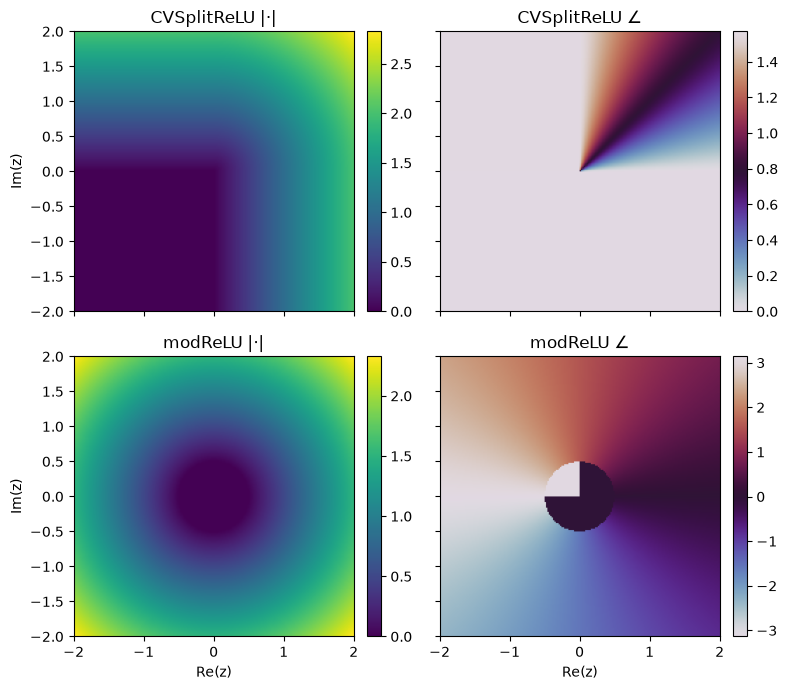
CVSplitReLU zeros the real/imag components independently — it doesn’t
preserve phase. modReLU only modulates magnitude (|z| - b)+ and leaves the
phase untouched.
5 · Welch’s PSD on a complex signal#
complextorch.signal.pwelch() is a torch port of scipy.signal.welch
that’s differentiable end-to-end — so it can sit inside a loss function.
from complextorch.signal import pwelch

t = torch.linspace(0, 1, 4096)
sig = torch.exp(1j * 2 * torch.pi * 50 * t).to(torch.cfloat) \
    + 0.5 * torch.exp(1j * 2 * torch.pi * 120 * t).to(torch.cfloat) \
    + 0.1 * torch.randn(4096, dtype=torch.cfloat)

f, psd = pwelch(sig, fs=4096.0, window=256, n_overlap=128)

plt.figure(figsize=(7, 3))
plt.semilogy(f.numpy(), psd.numpy())
plt.xlabel("Frequency (Hz)"); plt.ylabel("PSD"); plt.title("pwelch demo")
plt.tight_layout();
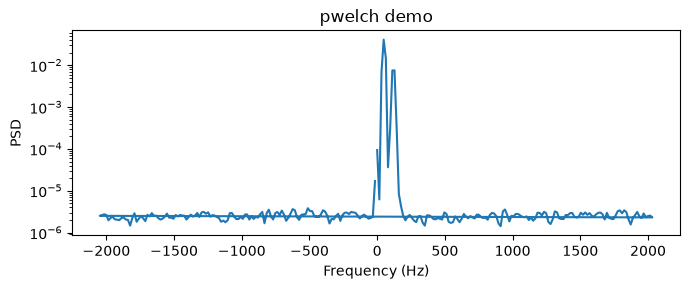
The two tones at 50 Hz and 120 Hz should be clearly visible. Because pwelch
is autograd-friendly, you can use the PSD as a spectral loss for training a
complex-valued generator network.
6 · Spectral pooling#
complextorch.nn.SpectralPool2d (and its 1-D / 3-D siblings)
downsamples by truncating the centered discrete Fourier spectrum — a
complex-valued port of the spectral pooling layer from Rippel et al. (2015)
and Trabelsi et al. (2018). It preserves the DC bin exactly, so the
spatial mean is unchanged.
import torch
import complextorch as ctorch

torch.manual_seed(0)
x = torch.randn(2, 3, 16, 16, dtype=torch.cfloat)
pool = ctorch.nn.SpectralPool2d((8, 8))
y = pool(x)

# Mean preservation: spectral pooling routes DC through unchanged.
mean_err = (y.mean(dim=(-2, -1)) - x.mean(dim=(-2, -1))).abs().max().item()
print(f"input  shape {tuple(x.shape)}")
print(f"output shape {tuple(y.shape)}")
print(f"max |mean(y) - mean(x)| = {mean_err:.2e}")
input  shape (2, 3, 16, 16)
output shape (2, 3, 8, 8)
max |mean(y) - mean(x)| = 1.67e-08
Because the operator is a linear function of the input (an FFT, a centered crop, and an IFFT), gradients flow back through it like any other layer:
x = torch.randn(2, 3, 16, 16, dtype=torch.cfloat, requires_grad=True)
y = ctorch.nn.SpectralPool2d((8, 8))(x)
y.abs().pow(2).sum().backward()
print(f"x.grad shape {tuple(x.grad.shape)}, all finite = {torch.isfinite(x.grad).all().item()}")
x.grad shape (2, 3, 16, 16), all finite = True
7 · Sequence models: positional encoding & state-space layers#
Attention is permutation-equivariant, so the native transformer needs an
explicit positional encoding. complextorch.nn.RotaryEmbedding (RoPE)
plugs straight into complextorch.nn.MultiheadAttention — it rotates the
per-head queries/keys by complex phasors, so build it with dim=d_k. See
Complex positional encodings.
torch.manual_seed(0)
d_model, n_heads, d_head = 32, 4, 8
rope = ctorch.nn.RotaryEmbedding(dim=d_head)
mha = ctorch.nn.MultiheadAttention(n_heads, d_model, d_head, d_head, rotary=rope)

seq = torch.randn(2, 16, d_model, dtype=torch.cfloat)   # (batch, length, d_model)
attn_out = mha(seq, seq, seq)
print("attention output:", attn_out.shape, attn_out.dtype)
attention output: torch.Size([2, 16, 32]) torch.complex64
The attention stack also supports the full torch.nn-parity mask API
(attn_mask, key_padding_mask, and the transformer-level masks) — a causal
mask keeps position \(t\) from attending to the future, the staple of
autoregressive decoding. See
Complex transformer & attention masking.
causal = ctorch.nn.Transformer.generate_square_subsequent_mask(16)
causal_out = mha(seq, seq, seq, attn_mask=causal)
print("causal attention output:", causal_out.shape)
causal attention output: torch.Size([2, 16, 32])
For long 1-D signals, the diagonal-complex state-space layers
(complextorch.nn.S4D / complextorch.nn.S4DBlock) run in linear
time. Their FFT convolution matches an exact recurrent rollout — see
Complex state-space models.
ssm = ctorch.nn.S4D(channels=8, state_size=32)
u = torch.randn(2, 64, 8, dtype=torch.cfloat)           # (batch, length, channels)
y_fft = ssm(u)
y_rec = ssm.recurrence(u)
print("S4D output:", y_fft.shape, y_fft.dtype)
print("FFT vs recurrence max abs diff:", (y_fft - y_rec).abs().max().item())
S4D output: torch.Size([2, 64, 8]) torch.complex64
FFT vs recurrence max abs diff: 1.3328003660717513e-06
8 · Signal front-ends & unitary recurrence#
A complextorch.nn.STFT is a learnable-window short-time Fourier
transform that emits a native complex spectrogram;
complextorch.nn.InverseSTFT inverts it. See
Learnable time-frequency front-ends.
torch.manual_seed(0)
sig = torch.randn(2, 256, dtype=torch.cfloat)        # complex baseband signal
stft  = ctorch.nn.STFT(n_fft=32, hop_length=8)
istft = ctorch.nn.InverseSTFT(n_fft=32, hop_length=8)
istft.window = stft.window                           # tie windows -> exact inverse

spec  = stft(sig)                                    # (2, 32, n_frames) complex
recon = istft(spec)
print("spectrogram:", spec.shape, spec.dtype)
print("interior reconstruction error:",
      (recon[..., 32:-32] - sig[..., 32:-32]).abs().max().item())
spectrogram: torch.Size([2, 32, 29]) torch.complex64
interior reconstruction error: 3.5762786865234375e-07
complextorch.nn.UnitaryRNN has a norm-preserving (unitary) recurrence —
see Unitary complex RNNs.
cell = ctorch.nn.UnitaryRNNCell(input_size=8, hidden_size=16)
W = cell.unitary_matrix()
print("W^H W == I:", torch.allclose(W.conj().T @ W, torch.eye(16, dtype=torch.cfloat), atol=1e-5))
W^H W == I: True
9 · Complex KANs & Steinmetz networks#
complextorch.models.CVKAN is a Kolmogorov-Arnold network whose edge
functions are learnable complex-plane radial bases — see
Complex-Valued KANs.
kan = ctorch.models.CVKAN([4, 8, 3], num_grid=6)
out = kan(torch.randn(16, 4, dtype=torch.cfloat))
print("CVKAN output:", out.shape, out.dtype)
CVKAN output: torch.Size([16, 3]) torch.complex64
complextorch.models.AnalyticNeuralNetwork processes complex data with
parallel real subnetworks and an analytic-signal consistency penalty (built on
complextorch.signal.analytic_signal()) — see
Steinmetz & Analytic networks.
net = ctorch.models.AnalyticNeuralNetwork(4, 16, 32)
y = net(torch.randn(8, 4, dtype=torch.cfloat))
print("Analytic-net output:", y.shape, "| consistency penalty:",
      round(net.consistency_loss(y).item(), 4))
Analytic-net output: torch.Size([8, 32]) | consistency penalty: 0.1153
Where next?#
Browse the API reference for the full module surface (
nn,signal,transforms,datasets,models).Read the Activations deep-dive for Type-A / Type-B / fully-complex / ReLU-variant theory.
New in 2.1: positional encodings, holographic attention, state-space models, unitary RNNs, time-frequency front-ends, complex KANs, and Steinmetz / analytic networks.
Check the changelog for what landed in the current release.